The RobotFX Renko Chart is an expert advisor that allows the creation and use of the renko bars charts on Metatader. As you probably know already, the Metatrader doesn’t have renko bars, its defaults being candlesticks, line and bars.
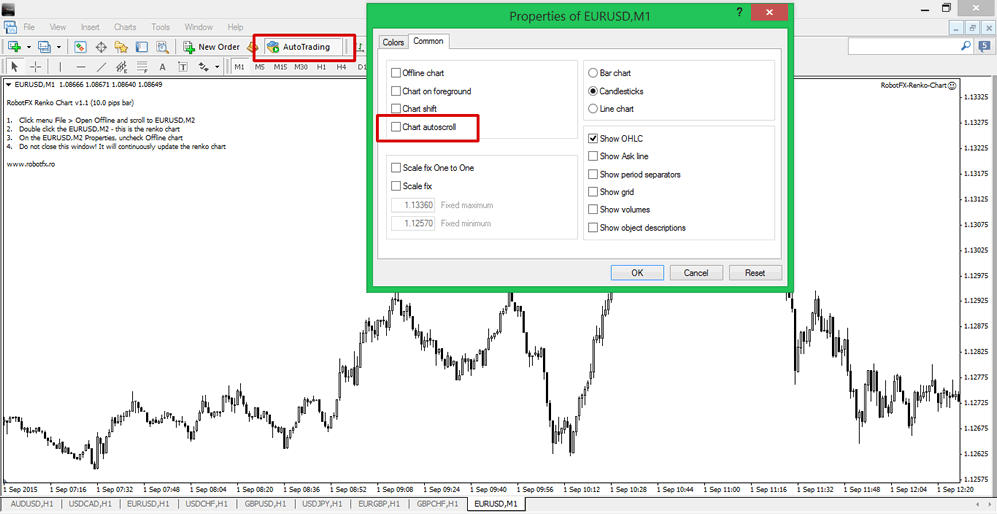
Before you load the EA on the chart it is recommended that you switch to the M1 time-frame and uncheck the autoscroll box (see above). Then keep pressing the Page Up button on your keyboard so the chart will scroll back a few months to load the history data. By default, the Renko EA will build renko charts of 10 pips bar size. You have the possibility to change the bar size with any other value you want or use the automatically calculated ATR bars.
Don’t forget to click the MetaTrader’s AutoTrading button.
After the EA loads on the M1 chart and creates the offline renko bars chart (default timeframe is M2) you should see the instructions in the left corner of the M1 chart, as in the picture above. Now click the menu File > Open Offline and choose the M2 chart of the pair you changed into renko.
You can choose any other timeframe name for the renko chart but make sure it is not one of the Metatrader’s default timeframes (ie not 1, 5, 15, 30, 60 etc).
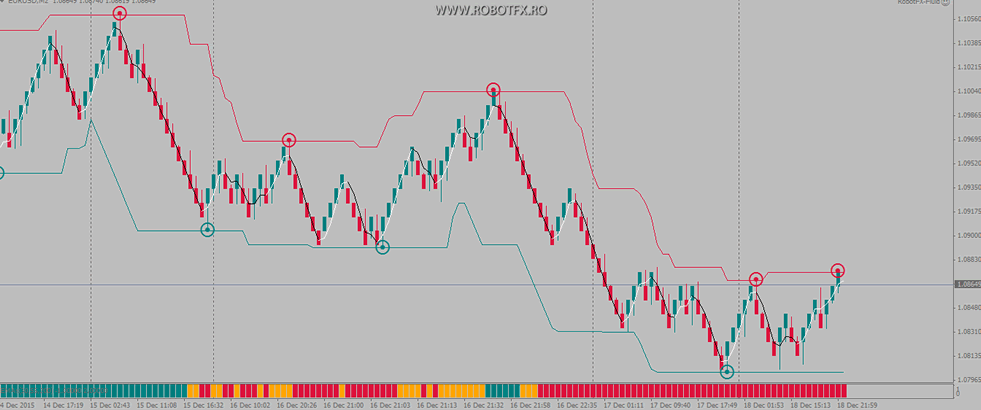
In the image above there is an example of a renko bars generated by RobotFX Renko Chart EA, with some indicators attached. Renko charts being price bars do not depend on the time, like the candlesticks for example. However, you can choose in the chart Properties to display the period separators, if you wish.
